While writing a program, there exists a situation where we need to execute a set of statements based on some conditions. In this situation we make use of conditional statements. With the help of conditional statements, we are able to brach the execution of a program.
Shell script will support below conditional statements:
1. If condition
2. If-else condition
3. If-else-if ladder condition
4. Nested If condition
5. case statement [explained in further chapter]
6. test condition
1. If condition
In if condition, the set of statements is executed if the condition is satisfied, else the statements will not be executed.
Syntax:
if [ condition ]
then
	#set of statements
fi
Note: There should be a space between “if” and opening braces “[“. If there is no space, error will be produced. There should be a space between the braces and the condition.
Example: I have created a shell script with below program:
#!/bin/bash
value=10

if [ $value -eq 10 ]
then
	echo "the value is 10"
fi
Output:
the value is 102. If-else condition
If there is a need to execute set of statements if the condition is true, and another set of statements if the condition is false, in this scenario we use “if-else”.
Syntax:
if [ condition ]
then
	#set of statements when true
else
	#set of statements when false

fi
Example:
#!/bin/bash
value=10

if [ $value -eq 190 ]
then
	echo "the value is 10"
else
	echo "the value is NOT 10"

fi
Output:
the value is NOT 103. If-else-if ladder condition
Syntax:
if [ condition ]
then
	#set of statements

elif [ condition ]
then
	#set of statements

else
	#set of statements
fi
Example:
#!/bin/bash
value=10

if [ $value -eq 190 ]
then
	echo "the value is 10"
elif [ $value -gt 9 ]
then
	echo "the value is greater than 9"
else
	echo "the value is NOT greater than 9"
fi
Output:
the value is greater than 94. Nested If condition
There can be an if statement inside a if statement. It is called as nested if statement.
Syntax:
if [ condition ]
then
	#set of statements
else
	if [ condition ]
	then
		#set of statements
	fi

fi
Example:
#!/bin/bash
value=10

if [ $value -eq 190 ]
then
	echo "the value is 10"
else
	if [ $value -gt 9 ]
	then
		echo "the value is greater than 9"
	fi
fi
Output:
the value is greater than 96. test condition
“test” keyword is used to test simple condition is true or false.
Syntax:
test [ condition ]“test” can be applied in 3 ways:
1. File test
2. String Test
3. Numerical Test
1. File Test:
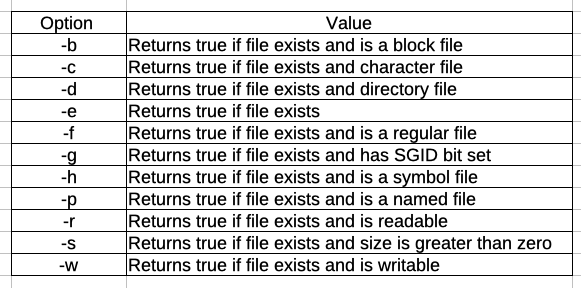
File test is used on files in particular. We shall learn about it more in later chapter. Below is the syntax and some options while using file test.
Syntax:
test <option> <file>Below are the options available on test files:
2. String Test
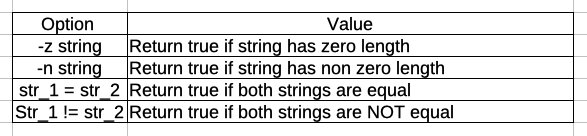
String test is used on strings. Below are the options available on string test.
Syntax:
test option <string>Example:
#!/bin/bash

var=''

test -z "$var"
echo $? #This will return the output of previous command.
#as the string is empty, it will return 0
Output:
0Example 2: To check if both strings are same
#!/bin/bash

var_1='prodevelopertutorial'
var_2='prodevelopertutorial.com'

test "$var_1" = "$var_2"
echo $? #This will return the output of previous command.
#as the string are not same, it will return 1
Output:
1Note: while using a string variable, that variable should be inserted in double quotes.
3. Numerical Test
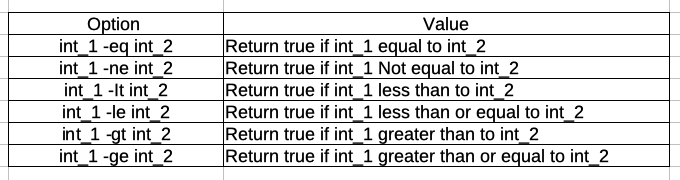
Numerical test will be done on 2 integer variable. Below are the list of options available.
Syntax:
test int_1 option int_2